SMTP Policies
Review Qboxmail SMTP policies, sending limits, DKIM signing, account blocks, and deliverability safeguards.
Qboxmail ensures a high level of deliverability for emails sent from its SMTP servers. To maintain a high service guarantee, we have implemented security measures on our SMTP servers against password theft (Account Takeover Protection), fair use policies, and sending limits.
Account Takeover Protection
Account Takeover is a type of attack in which criminals manage to steal a victim’s identity by stealing their login credentials.
Qboxmail includes an Account Takeover Protection system. The protection consists of several layers of analysis and procedures. Access to email accounts is constantly monitored and, if anomalous due to time or origin, may trigger an alert.
When suspicious activity is detected, it is automatically reported both to the user and to their administrator, and the anomalous activity is immediately blocked.
From the Control Panel, you can analyze these suspicious activities using Tracemail, and you can apply additional security measures such as two-factor authentication, blocking the reuse of old passwords, or restricting access to email accounts only from trusted IP addresses or corporate VPNs.
Fair use policies for SMTP services
Below are some of the permitted and prohibited activities that customers and users must comply with.
- sending personal emails from the user’s email clients is allowed (Outlook, Thunderbird, iPhone, Webmail, or other email clients)
- sending transactional emails from your billing/e-commerce systems is allowed
- sending newsletters/email marketing is not allowed
- the sender email address (
Fromfield) must match the domain of the authentication username, or an alias domain associated with the real domain. It is therefore possible to send email messages only with a sender domain that is active on Qboxmail and that you manage - any other type of abuse, considered as such because it may affect the operation of other users, results in temporary blocking of the SMTP service
Sending limits from Qboxmail SMTP servers
The Authenticated SMTP provided with the email hosting service must be used in compliance with the following limits:
- the maximum size of messages you can send is 50MB
- the maximum number of recipients for each single send is 150
- the maximum sending rate is 5 messages per second (300 per minute)
- the maximum number of authentications that can be performed within 30 minutes is 300
- the maximum number of different IP addresses from which you can perform authentications within 30 minutes is 5
- messages must have a sender that is an active domain on Qboxmail
Each active email account on Qboxmail includes a maximum number of emails that can be sent, up to 250 messages in 24h.
Each single send corresponds to one recipient email address and is counted as such within the limit of 250 messages in 24h. For example, if you send a single communication to 10 addresses, the system will record 10 sends.
When this threshold is exceeded, SMTP returns the error “Quota exceeded (number of mails in total)”.
After the daily sending limit for an email account is exceeded, the system sends an email notification to the user and to the mailbox owner, specifying that the limit has been exceeded.
Messages sent within the same domain are accepted even after the threshold is reached.
Daily sending limits
If you need to send more than the included 250 messages per day, you can exceed the daily sending limit for an individual email account.
You can increase the daily sending limits directly from the Control Panel by selecting Domain > Email Account > General > Sending Limits and choosing the desired option. The various limits are divided as shown in the following table:
| Sends in 24h per mailbox | Basic | Professional | Enterprise |
|---|---|---|---|
| 250 | included | included | included |
| 1,000 | paid | included | included |
| 2,000 | paid | paid | paid |
| 5,000 | paid | paid | paid |
You can find all service prices on the pricing page in the Control Panel.
If you need a higher number of sends, we invite you to consider the Email Delivery service.
The amount will be automatically included in the next invoice.
If you use the annual billing plan, the invoice for the SMTP service will also be annual and will coincide with the service expiration date.
Please remember that all emails sent from our SMTP servers are automatically signed with DKIM. For more information about DKIM signing, see the related documentation.
Anti-spam and anti-abuse policies
The policies and limits on our SMTP servers are necessary to prevent possible blacklist listings or penalties, to avoid any maximum email sends by “botnets” that may have fraudulently obtained a user’s password, or to prevent possible abuse by users of the service themselves.
Violation of the policies results in the account being blocked at SMTP level if anomalous activity is detected in the connection to the server or in email sending. Anomalous activity means a high number of SMTP authentications within a few minutes, simultaneous authentications from multiple distinct IP addresses, or sending messages containing Spam/Phishing. When SMTP is blocked, all other features, including reading emails, remain active.
The block has been designed not to be triggered during normal email sending activity through standard email reading and sending tools (MS Outlook, Thunderbird, iPhone, Webmail, or other email clients). The block may instead be triggered if the account is used in automated email sending systems (such as Sendblaster or other mass Newsletter sending software) or if mass emails are sent from your email client or from webmail.
SMTP unblocking
You can independently unblock an account that has gone into “SMTP block” from the Control Panel by going to Domains > Domain Name > Blocked Email Account > Settings > General > Services > re-enable the SMTP connection access checkbox > Save.
Before unblocking, we recommend that you first scan the user’s PC to make sure there are no viruses or malware, and then change the password of the blocked account. For greater security, you can enable additional measures such as IP address restrictions or two-factor authentication.
If, after unblocking, new abuse by the same user occurs again, the account will be blocked by our operators and will remain blocked until we have received your confirmation that the abuse has stopped, together with confirmation that the issue causing the sending of spam/phishing emails has been resolved (usually a PC infected by a virus that steals the email account password).
Monitoring and tracking email messages with Tracemail
Using the Tracemail > Sent Mail tool, available in the Control Panel, you can view details of the emails sent by the email accounts of a specific domain. This can help diagnose the causes of the block.
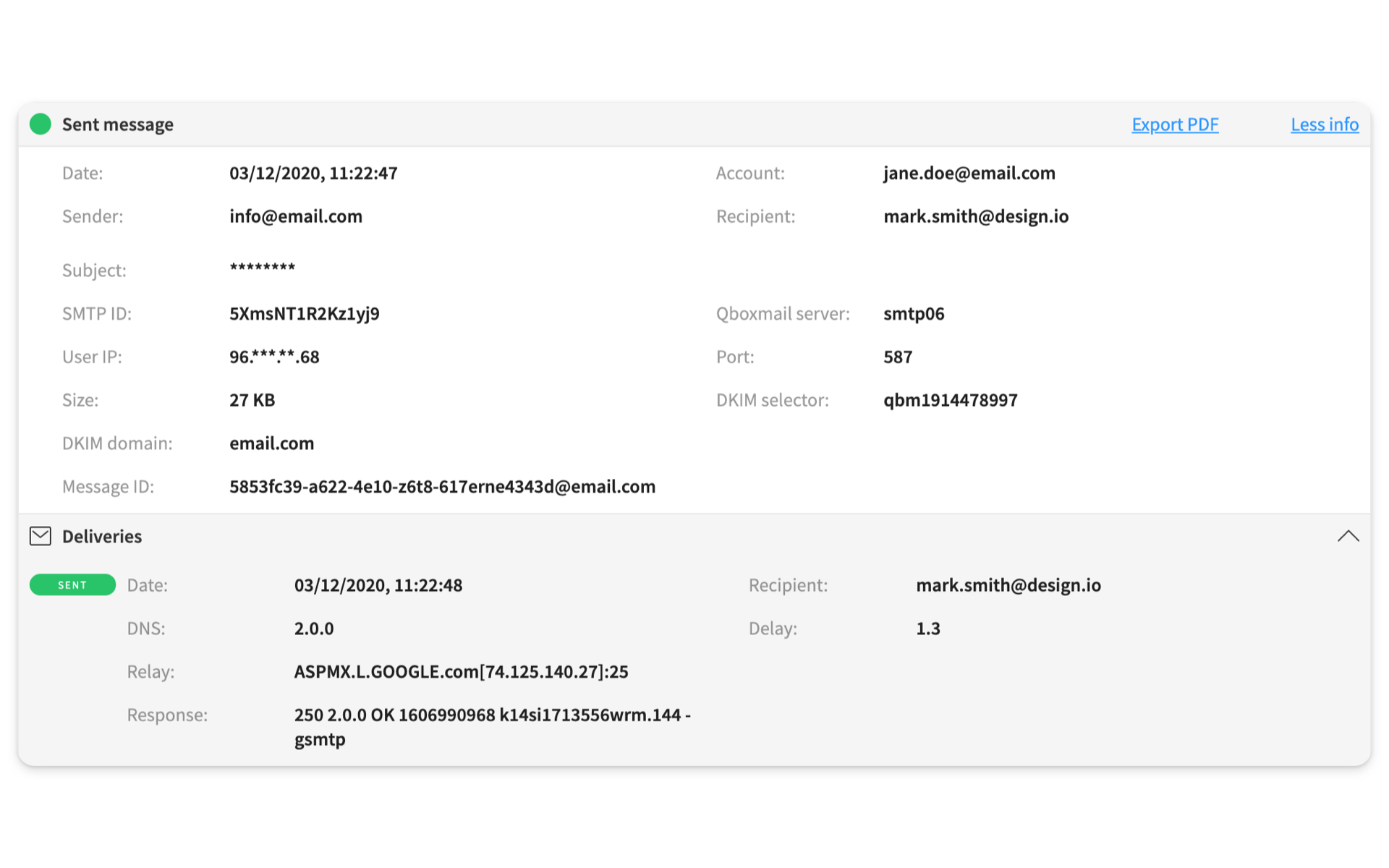
Spam from a compromised SMTP account analyzed by Tracemail
The SMTP service analyzes outgoing emails to detect the presence of viruses or spam. If these messages contain material that is harmful to recipient users or to the reputation of Qboxmail servers, sending is not allowed.
Sending limits during the Free Trial period
During the free trial period, the number of messages you can send is reduced to 25 per email account within 24 hours in order to prevent abuse. When you exceed this limit, the SMTP server returns the error “Quota exceeded (number of mails in total)” during sending. The counter is automatically reset 24 hours after the first send. The limit is removed once you complete an order from the Control Panel.